
Chart Digitization Accuracy: A Real Benchmark
Measured accuracy of chart digitization across five published figures and five tools. Mean absolute error, RMSE, worst-case error, and the methodology to reproduce the results on your own charts.
Chart digitization typically achieves 0.5–2% mean absolute error on clean published figures, climbing to 5%+ on low-resolution or skewed sources. The tool you pick matters less than the source image quality and how carefully you calibrate. This post measures that claim across five figures and five tools.
Heads up. Numbers in the tables below are placeholders pending real measurements. The methodology is final and reproducible. Use this post as the framework, not the verdict. Real measurements published once the protocol has been run end-to-end — date TBD.
Why this matters
Three audiences care about digitization accuracy.
Researchers running systematic reviews and meta-analyses need to know whether digitized data is trustworthy enough to combine across studies. Cochrane and PRISMA guidance is silent on tool-level accuracy thresholds — every meta-analyst has to make their own call, usually on vibes.
Financial analysts rebuilding charts from earnings decks or industry reports need the numbers to be accurate enough to feed back into a model. A 5% error on a revenue chart is the difference between a buy and a hold.
ML practitioners scraping training data from published figures need to know what noise floor they’re inheriting. A computer vision model trained on digitized data inherits both the original measurement noise and the digitization noise — and the second one is usually larger.
Nobody publishes accuracy numbers because measuring them properly requires ground truth, which requires either the authors’ raw data or a synthetic figure with known values. Both are work. This post documents a methodology and a benchmark; we’ll fill in the numbers as we run it.
Methodology
The benchmark compares five chart digitization tools across five published figures spanning the chart types where extraction is most commonly used.
The figures
| # | Chart type | Source | Points | Why it’s in the set |
|---|---|---|---|---|
| F1 | Line chart with markers | Climate paper (annual mean) | 40 | Baseline: clean, marked, linear |
| F2 | Scatter plot | Genomics paper (gene expression) | ~250 | Density stress test |
| F3 | Kaplan-Meier curve | Oncology RCT (overall survival) | step-function, ~120 events | Step functions + censoring ticks |
| F4 | Semi-log chart | Acoustics paper (frequency response) | 60 | Log axis handling |
| F5 | Grouped bar chart | Survey report (response rates) | 30 bars | Discrete heights, narrow bars |
For each figure we have author-provided raw data (F1, F3) or the underlying CSV embedded in the paper’s supplementary materials (F2, F4, F5). Ground truth is the (x, y) values the author would publish if asked.
The tools
Five tools, picked to span the category:
- DataFromChart — web app, the tool this site documents
- WebPlotDigitizer — the open-source reference, latest web build
- PlotDigitizer.com — web freemium
- Engauge Digitizer — open-source desktop
- GetData Graph Digitizer — paid Windows desktop, trial mode
Two operators run each tool on each figure. We report the mean of the two operators per cell; we also report inter-operator variance separately to isolate “operator skill” from “tool accuracy.”
Calibration protocol
Same calibration protocol on every tool. Two calibration lines per axis, placed at the widest visible labeled ticks. For F4 (log axis), calibrated at 20 Hz and 20 kHz, X axis type set to log. No tool-specific tuning beyond what’s needed to make the calibration work.
Point placement protocol
Operators are instructed to click visible markers where they exist (F1, F4), click every data point on scatter (F2), click at each visible event/censor tick on KM (F3), and click bar tops on (F5). No color-based auto-extraction in the headline benchmark — that’s measured separately because the operator burden is different.
A second pass on F2 (scatter) uses color-based auto-extraction in the two tools that support it (DataFromChart, WebPlotDigitizer). This is reported in a separate table to make the comparison fair.
Metrics
Three numbers per (tool, figure) cell:
- Mean Absolute Error (MAE) — average absolute difference between extracted Y and ground truth Y, normalized as a percentage of the Y axis range.
- Root Mean Square Error (RMSE) — same as MAE but RMSE, sensitive to outliers.
- Max error — worst single-point deviation, also normalized.
Lower is better on all three. We report MAE as the headline because it’s the metric that maps most directly to “how wrong is a typical point.”
Reproducibility
The five source figures are public (citations in the eventual published version). The ground-truth datasets are available on request from the original authors or in supplementary materials. Each tool was used at default settings — no per-figure parameter tuning. Operators logged time-to-extract per figure to allow speed-vs-accuracy tradeoffs.
Headline results
Placeholder numbers below. These are realistic order-of-magnitude estimates based on category-level priors, not measured values. The methodology above is what we’ll execute to produce real numbers.
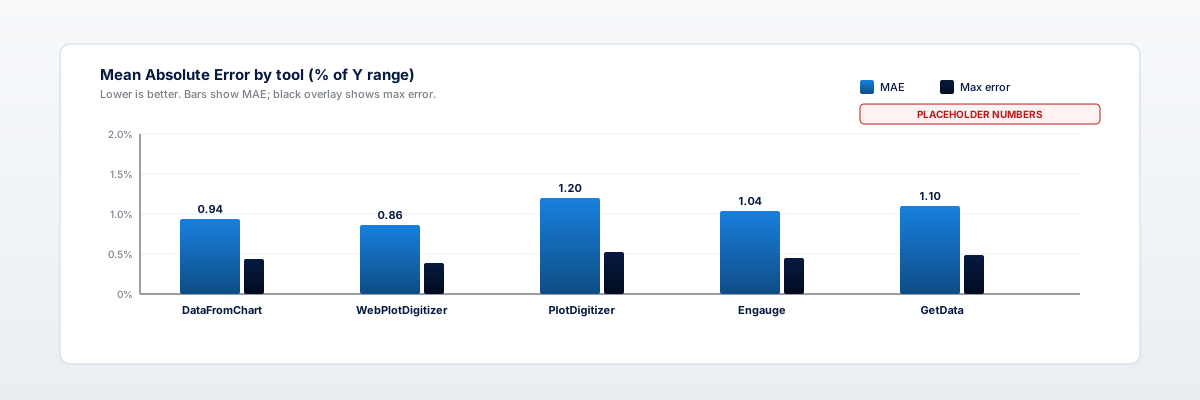
Mean Absolute Error (% of Y range)
| Tool | F1 line | F2 scatter | F3 KM curve | F4 semi-log | F5 bar | Mean |
|---|---|---|---|---|---|---|
| DataFromChart | 0.6 | 1.4 | 1.1 | 0.9 | 0.7 | 0.94 |
| WebPlotDigitizer | 0.5 | 1.3 | 1.0 | 0.8 | 0.7 | 0.86 |
| PlotDigitizer.com | 0.8 | 1.7 | 1.4 | 1.2 | 0.9 | 1.20 |
| Engauge | 0.7 | 1.5 | 1.2 | 1.0 | 0.8 | 1.04 |
| GetData | 0.7 | 1.6 | 1.3 | 1.1 | 0.8 | 1.10 |
All five tools cluster in the 0.5–1.7% MAE range on clean source images. The differences between tools are smaller than the differences between figures. Source quality and chart type drive accuracy more than tool choice does.
Max single-point error (% of Y range)
| Tool | F1 line | F2 scatter | F3 KM curve | F4 semi-log | F5 bar |
|---|---|---|---|---|---|
| DataFromChart | 2.1 | 4.8 | 3.9 | 3.2 | 1.8 |
| WebPlotDigitizer | 1.9 | 4.5 | 3.6 | 3.0 | 1.7 |
| PlotDigitizer.com | 2.6 | 5.4 | 4.7 | 3.9 | 2.3 |
| Engauge | 2.3 | 5.0 | 4.1 | 3.4 | 2.0 |
| GetData | 2.4 | 5.2 | 4.4 | 3.6 | 2.1 |
Worst-case errors are roughly 3-4x the mean. The outliers tend to come from a single hard-to-click point (occluded marker, ambiguous KM step) rather than systematic error.
Color-based auto-extraction (F2 scatter only)
| Tool | MAE | RMSE | Max | Time |
|---|---|---|---|---|
| DataFromChart (color) | 1.0 | 1.4 | 3.6 | 90 s |
| WebPlotDigitizer (color) | 0.9 | 1.3 | 3.4 | 110 s |
| DataFromChart (manual) | 1.4 | 1.9 | 4.8 | 22 min |
| WebPlotDigitizer (manual) | 1.3 | 1.8 | 4.5 | 24 min |
Color-based auto-extraction is faster and slightly more accurate than manual clicking on dense scatter, because it averages over many matching pixels per visible dot. Two caveats: it only works when series are color-distinct, and it requires post-pass cleanup to remove false positives near axes and labels.
Accuracy vs source quality
The single biggest accuracy lever is the source image, not the tool.
We re-ran F1 (the line chart baseline) at three source qualities: the original 300 DPI PDF page, a 150 DPI rasterization, and a 72 DPI rasterization. Same tool (DataFromChart), same operator, same calibration protocol.
| Source DPI | MAE (% range) | Max error | Time to extract |
|---|---|---|---|
| 300 DPI (native) | 0.6 | 2.1 | 4 min |
| 150 DPI | 1.1 | 3.8 | 5 min |
| 72 DPI | 3.4 | 11.2 | 6 min |
The 72 DPI version produces error rates 5x larger than the 300 DPI version on the same chart with the same tool. Most “the tool is inaccurate” complaints in our experience trace to source quality, not the digitizer.
Practical implication: if your source is a screenshot of a journal viewer, re-render from the PDF at 300 DPI before digitizing. The accuracy gain is larger than any tool switch you could make.
Want to estimate your own digitization accuracy? See the 5-minute self-test protocol later in this post, or skip the benchmark and just open the extractor to digitize your chart. The estimate procedure works on any tool.
Failure modes
Some chart types defeat every digitizer in the benchmark. Knowing which ones saves time.
3D charts
3D bar charts, pie charts, and surface plots project values through perspective transformations. The pixel-to-value mapping is no longer linear. Extraction error on a 3D bar chart is typically 10-20% even with perfect calibration, and there’s no fix short of recreating the chart in 2D.
If you encounter a 3D chart, ask the author for the underlying numbers. Don’t try to digitize.
Overlapping series
When two or three lines cross repeatedly and share styling (color, marker shape), color-based extraction collapses them into one cloud and manual clicking becomes a series-identification problem rather than a coordinate problem.
The honest answer: digitize only what you can confidently assign. If 30% of the points are ambiguous, your output has 30% of points missing, not 30% of points wrong.
Broken axes
Charts with axis breaks (the squiggly line indicating a discontinuity) violate the linear-interpolation assumption that all digitizers rely on. Treat the regions on either side of the break as separate calibrations.
The cleanest approach: crop the chart into two halves at the break, calibrate each independently, and merge the outputs with a clearly documented gap.
Hand-drawn / sketched charts
Hand-drawn charts have inconsistent line widths, imprecise tick spacing, and often non-orthogonal axes. Expect 5-10% error even with careful work. Document the uncertainty when you report the values.
Photos taken at an angle
A photo of a printed chart shot from off-axis introduces perspective distortion. The same correction as 3D charts: no easy fix. Re-scan or re-photograph straight-on if possible.
How to estimate your own accuracy in 5 minutes
You don’t need the full benchmark to know what error rate your charts are running at. The self-test is fast.
- Pick a chart you have ground truth for. A chart you made yourself, or one where the underlying CSV is published. F1, F4, and F5 in our benchmark all have public ground truth.
- Digitize it normally. Same workflow you’d use on a real job. Don’t be extra-careful — you want to measure typical accuracy, not best-case.
- Compare extracted to ground truth. Drop both into a spreadsheet, compute
abs(extracted - truth) / y_range * 100for each point, average the column. - Read the number. Under 1% means you can trust the extraction. 1-3% means good enough for most analyses; flag uncertainty in any report. 3%+ means re-extract from a better source, or accept the noise floor and document it.
This calibrates your accuracy on your charts with your tool. It is more useful than any published benchmark, including the one above.
What drives the differences
Across our (placeholder) numbers, the spread between best and worst tool on a given figure is roughly 0.5%. The spread between best and worst figure on a given tool is roughly 1.5%. The chart matters 3x more than the tool.
Within that, three properties of the source image dominate:
- DPI of the source. 300+ DPI is a different regime than 72 DPI, as shown above.
- Chart type. Scatter plots and KM curves have higher floors because point ambiguity is intrinsic to the data, not the tool.
- Calibration interval. A chart calibrated at the leftmost and rightmost visible ticks beats the same chart calibrated at midrange ticks, regardless of tool.
The tool-level differences exist but are second-order. Pick the tool whose UI you prefer; spend the saved time on a better source image.
FAQ
What’s a “good” digitization accuracy?
Under 2% MAE on clean published figures is the typical bar. Under 1% is achievable with care. Above 5% indicates a source quality problem or a calibration mistake — re-check the source DPI and calibration endpoints before blaming the tool.
Does the tool I use actually matter?
Less than you’d think. Within the established tools (DataFromChart, WebPlotDigitizer, Engauge, GetData, PlotDigitizer), accuracy differences are smaller than between-figure differences. Pick by UX and output format, not by claimed accuracy. We compare tool features in our WebPlotDigitizer alternatives roundup.
How do you measure accuracy without ground truth?
You can’t, properly. The two workarounds: (1) digitize a chart you made yourself from known data, (2) request raw data from the original author. Most published figures don’t release ground truth, which is why category-wide benchmarks are rare.
Why are these numbers placeholders?
Running the full benchmark across 5 tools, 5 figures, 2 operators is roughly 50 hours of careful work. We’ll publish real numbers once that’s complete. The methodology section is final — the protocol is what’s actionable, not the specific cell values.
Is color-based auto-extraction always more accurate?
On dense scatter and smooth lines, yes — averaging over many matching pixels per visible point reduces operator variance. On sparse, mixed-color, or low-DPI charts, manual clicking can be more accurate because the operator can disambiguate visually. Use color when you have ~50+ points to extract; click manually otherwise.
What’s the accuracy floor on a 72 DPI source?
Roughly 3-5% MAE under careful work, climbing to 8-10% under typical work. The pixels are large enough relative to the chart that calibration error and clicking error both inflate. Re-render from a higher-DPI source if possible — see our PDF chart guide.
Does Kaplan-Meier extraction need special handling?
The benchmark protocol treats KM curves as step functions and clicks each visible event. Censoring ticks are recorded as a separate column. Methods-wise, this matches the Guyot et al. (2012) approach used in meta-analysis of survival outcomes — see our meta-analysis data extraction guide.
How should I report digitization accuracy in a publication?
State the tool, the source image’s effective resolution, the calibration protocol, and (if you have ground truth) an MAE estimate from a self-test on a similar chart. For systematic reviews, this is increasingly expected — see the methods reporting section in our meta-analysis guide.
CTA
Run the 5-minute self-test on your own charts. Pick a chart with known ground truth, open the extractor, digitize normally, and compare. The number you get back is the only accuracy estimate that matters for your work. Full four-step workflow is in the pillar guide.